Agentic Adventures -Side Quest LlamaLauncher Part 2
Previously
In the last post, I ended up getting the model to creatre a pyside6 UI file, I think this will be the way forward as it makes designing stuff much easier and visual.
I plan to give the model a number of tasks based around both the code and ui and see how it fairs.
Task 1 rename the widgets
You can see from the image that the model has used camelCase for object names, let’s start by changing this.
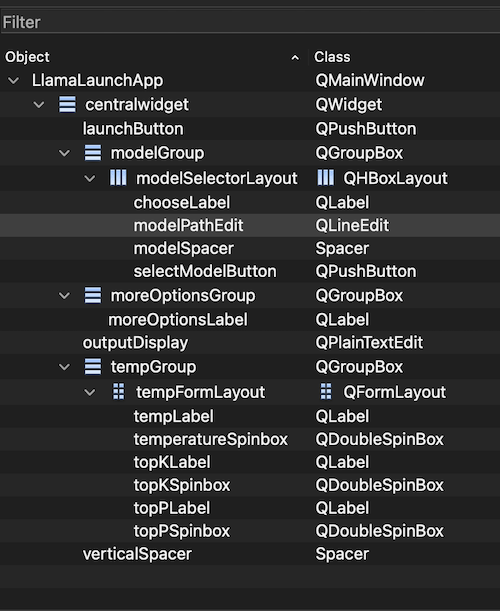
I have been again experimenting with parameters and have launched the server with the following arguments
llama-server --api-key 12345\
    -m ~/teaching/AI_Models/Qwen3.6-35B-A3B-UD-Q4_K_XL.gguf \
    --jinja -ngl 999 -np 1 --flash-attn on  -fit off  --no-mmap  --jinja --ctx-size 32768 \
    --temp 0.4 --min-p 0.0 --top-p 0.80 --top-k 20 --repeat-penalty 1.05 --spec-type draft-mtp \
    --spec-draft-n-max 4
I use the following prompt.
The objects in [@llama_launch.ui](file:///Volumes/teaching/Code/LLamaLauncher/ui/llama_launch.ui) are using pascalCase this is a python project so re-name as camel_case and ensure PEP8
That was quick and easy.
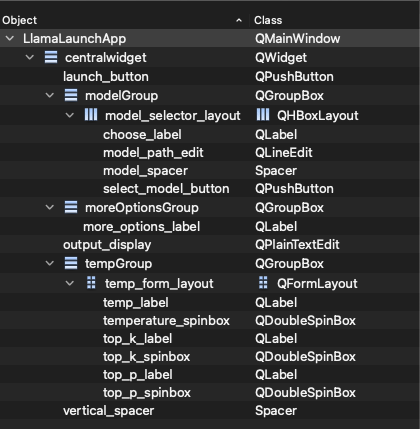 However my prompt was a little too specific as it said moreOptionsGroup` *(unchanged - not an objectName. Just told it to update all and now sorted, see
AgentChat5.md
However my prompt was a little too specific as it said moreOptionsGroup` *(unchanged - not an objectName. Just told it to update all and now sorted, see
AgentChat5.md
Integrate the ui
This is going to be a more complex task, I want to take the existing code that generates the ui from python code and then use the ui loader and update to use that for everything.
At it’s simplest we can use code similar to
loader = QUiLoader()
ui_file = QFile(ui_file_path)
if not ui_file.open(QFile.ReadOnly):
    raise RuntimeError(f"Cannot open UI file: {ui_file_path}")

loaded_ui = loader.load(ui_file, parent)
ui_file.close()
However this doesn’t make the ui widgets members of the class so you usually have to add an extra step
for widget in loaded_ui.findChildren(QWidget):
    name = widget.objectName()
    if name:
        setattr(parent, name, widget)

for layout in loaded_ui.findChildren(QLayout):
    name = layout.objectName()
    if name:
        setattr(parent, name, layout)
I am going to give the model a hint that I want the ui components to be loaded as part of the main window class (self.widget_name) and see what it can do. I think this prompt needs to be very carefully thought out. I will start with this
in @main.py replace the ui generation code in @main.py to use the ui file @llama_launch.ui You should use the QUiLoader() to do this, and each object in the ui file should be add to the LlamaLaunchApp main window, for example launch_button will before self.launch_button in the mainwindow. Ensure the existing functionality still works.
Let’s see how it works.
As you can see it made a worktree however there was an issue in running.
./main.py
Traceback (most recent call last):
  File "/Volumes/teaching/Code/LLamaLauncher/./main.py", line 98, in <module>
    window = LlamaLaunchApp()
  File "/Volumes/teaching/Code/LLamaLauncher/./main.py", line 24, in __init__
    self._setup_ui()
    ~~~~~~~~~~~~~~^^
  File "/Volumes/teaching/Code/LLamaLauncher/./main.py", line 41, in _setup_ui
    self.model_path_edit = self._ui_file.findChild(type(self._ui_file.model_path_edit), "model_path_edit")
                           ~~~~~~~~~~~~~~~~~~~~~~~^^^^^^^^^^^^^^^^^^^^^^^^^^^^^^^^^^^^^^^^^^^^^^^^^^^^^^^^
RuntimeError: libshiboken: Internal C++ object (PySide6.QtWidgets.QMainWindow) already deleted.
llamalauncher➜  LLamaLauncher git:(main) ✗
This is taking quite a long time to process and still result in the errors
 ./main.py
Traceback (most recent call last):
  File "/Volumes/teaching/Code/LLamaLauncher/./main.py", line 95, in <module>
    window = LlamaLaunchApp()
  File "/Volumes/teaching/Code/LLamaLauncher/./main.py", line 24, in __init__
    self._setup_ui()
    ~~~~~~~~~~~~~~^^
  File "/Volumes/teaching/Code/LLamaLauncher/./main.py", line 42, in _setup_ui
    self.model_path_edit = central.findChild(type(central.model_path_edit), "model_path_edit")
                                                  ^^^^^^^^^^^^^^^^^^^^^^^
AttributeError: 'PySide6.QtWidgets.QWidget' object has no attribute 'model_path_edit'
I have now also run out of context AgentChat7.md so must re-start.
After a few iterations AgentChat8.md I have a working ui (different size which is odd),
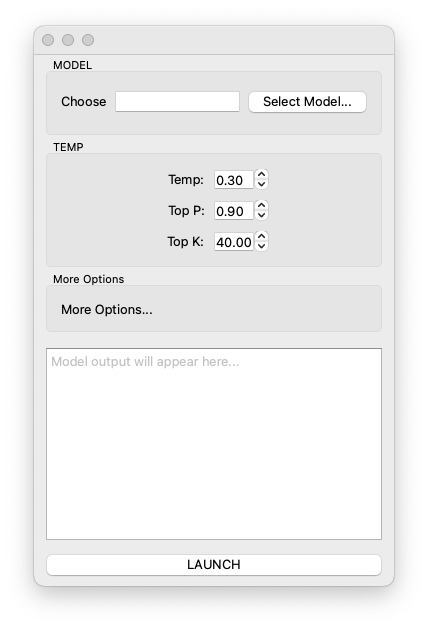
I’m not happy with the ui loader code as it doesn’t auto discover the ui elements.
def _setup_ui(self) -> None:
        """Load the main window UI from the .ui file."""
        loader = QUiLoader()
        ui_path = Path(__file__).resolve().parent / "ui" / "llama_launch.ui"
        ui_instance = loader.load(ui_path)

        self.setCentralWidget(ui_instance.centralwidget)

        # Store references to every interactive widget by the names used
        # in the .ui file so that other methods can access them.
        central = ui_instance.centralwidget
        self.model_path_edit = central.findChild(QObject, "model_path_edit")
        self.select_model_button = central.findChild(QObject, "select_model_button")
        self.temperature_spinbox = central.findChild(QObject, "temperature_spinbox")
        self.top_p_spinbox = central.findChild(QObject, "top_p_spinbox")
        self.top_k_spinbox = central.findChild(QObject, "top_k_spinbox")
        self.output_display = central.findChild(QObject, "output_display")
        self.launch_button = central.findChild(QObject, "launch_button")
I will see if it can improve it a little, zed allows sending in selections of code which I have yet to try so lets see.
[@main.py (32:49)](file:///Volumes/teaching/Code/LLamaLauncher/main.py#L32:49) is it possible for this to auto load and discover the Widgets rather than naming them directly as in self.model_path_edit = central.findChild(QObject, "model_path_edit")
Ok AgnetChat9.md gives the details, but the resultant code is a bit rubbish
def _setup_ui(self) -> None:
        """Load the main window UI from the .ui file."""
        loader = QUiLoader()
        ui_path = Path(__file__).resolve().parent / "ui" / "llama_launch.ui"
        ui_instance = loader.load(ui_path)

        self.setCentralWidget(ui_instance.centralwidget)

        # Auto-discover interactive widgets by type.
        # For types with a single instance we unpack directly.
        # For types with multiple instances we sort by objectName()
        # so the assignment order is deterministic (alphabetical).
        central = ui_instance.centralwidget

        def _find[T](cls: type[T], name: str) -> T:
            """Find a single child widget by type and objectName."""
            widget = central.findChild(cls, name)
            if widget is None:
                raise RuntimeError(f"Missing widget: {cls.__name__} '{name}'")
            return widget

        self.model_path_edit = _find(QLineEdit, "model_path_edit")
        self.select_model_button = _find(QPushButton, "select_model_button")
        self.launch_button = _find(QPushButton, "launch_button")
        self.temperature_spinbox = _find(QDoubleSpinBox, "temperature_spinbox")
        self.top_k_spinbox = _find(QDoubleSpinBox, "top_k_spinbox")
        self.top_p_spinbox = _find(QDoubleSpinBox, "top_p_spinbox")
        self.output_display = _find(QPlainTextEdit, "output_display")
Let me give it a hint, I opened up my standard ui loader and gave it the prompt
[@main.py (36:63)](file:///Volumes/teaching/Code/LLamaLauncher/main.py#L36:63) could you not use something like [@ui_loader.py (34:43)](file:///Volumes/teaching/PipeLineAndTD/ClutterBase2026/clutter_base/src/clutter_base/gui/ui_loader.py#L34:43)
It has managed to create something but it doesn’t quite work as most of the widgets are not found.
def _setup_ui(self) -> None:
        """Load the main window UI from the .ui file.

        All child widgets and layouts are auto-assigned as attributes
        on this instance by their ``objectName`` so that the .ui file
        controls which names are available.
        """
        loader = QUiLoader()
        ui_path = Path(__file__).resolve().parent / "ui" / "llama_launch.ui"
        loaded_ui = loader.load(ui_path)

        self.setCentralWidget(loaded_ui.centralwidget)

        for widget in loaded_ui.findChildren(QObject):
            name = widget.objectName()
            if name:
                print(f"Found widget: {name}")
                setattr(self, name, widget)
Yet again I have a meeting and have had to turn off the agent as I can’t run teams and the agent at the same time! I think I will put my whole ui loader class into the code and use that for ease now.
I first need to change the ui file that was generated to a QWidget from a QDialog, then make the MainWindow have a centeral widget to add it too. I have removed the centeral widget in the ui (as this was for the main window) and made it work nicely. I will commit this branch and continue in another post.
What this really show is that whilst agents are ok, they are not domain experts and you really need to know what you are doing to get the best from them.