Agentic Adventures -Side Quest LlamaLauncher Part 6
Need more (Head)room.
On of the issues I ran into in the last set of updates to the LlamaLauncher tool was the context size getting bigger and running out of tokens / context.
For example running the following “ask” prompt
analyze this project and suggest improvements
Zed reports the size as Input 22k / 66K Output 1.6K / 66L and as you can see the token size does start to get big just with the basics needed.
I recently read an register article on headroom ai which looked interesting.
The core premice is that headroom sits between your editor sending data and the llm processing the data and removes stuff that is not really relevent to the llm by compressing the context before the request reaches the model. From the Register article
Headroom’s first step is a process called CacheAligner which looks only for information that has been changed within input that’s already been entered, and ships only the new info, eliminating the need to replace an entire body of mostly unchanged text in KV Cache, the cache where the AI provider stores the user’s context window.
Installing headroom
As I use uv for most things I decided to install via uv as a tool
uv tool install "headroom-ai[all]"
Once this is installed you can run headroom in the terminal as normal.
We now need to setup some parameter for headroom and launch it to proxy to the llama-server.
export OPENAI_TARGET_API_URL=http://localhost:8080/v1
export HEADROOM_CODE_AWARE_ENABLED=1
export OPENAI_API_KEY=12345
headroom proxy --port 8787
You can see the port set is the same one we have been using in zed for the server and we are also using the same key value.
We now need to set zed to look at this new port 8787
"language_models": {
    "openai_compatible": {
      "llama.cpp": {
        "api_url": "http://localhost:8787/v1",
        "available_models": [
          {
            "name": "LLamaServerCurrentModel",
            "display_name": "LLamaServerCurrentModel",
            "max_tokens": 131072,
            "max_output_tokens": 32768,
            "images": true,
          },
        ],
      },
    },
  },
Zed will require you to re-enter the key as the port has changed, then we can use as before.
Now zed is reporting a slightly reduced input but a larger output at 2.2K, TBH I was not expecting too much from this simple test as there are no real tool call or output to generate from run to run but I think when using in real situations this should help a lot more.
There seems to be a little slowdown but not much.
Launch script.
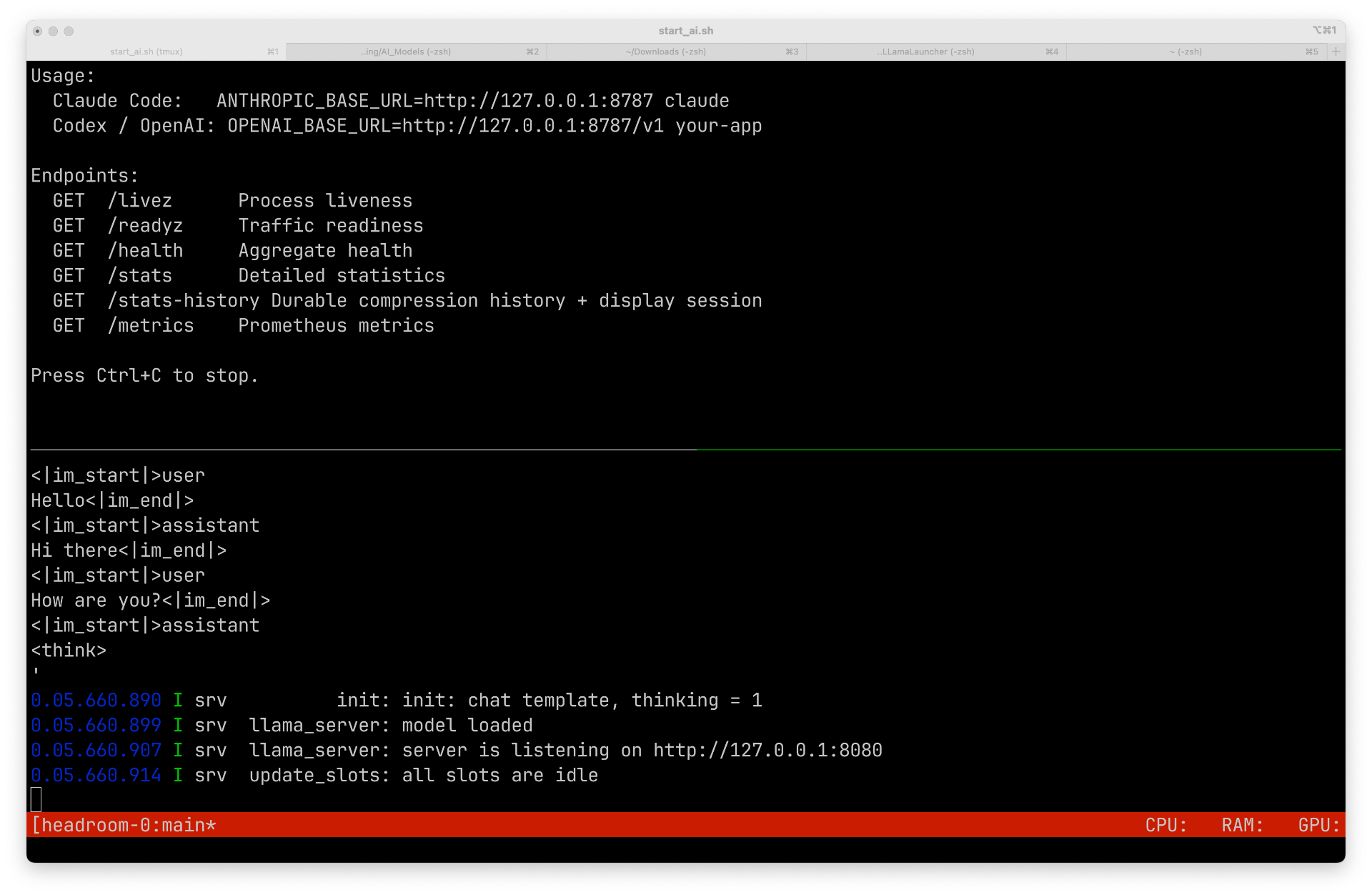
I have decided it is time to generate a bash script to launch both the headroom proxy and the llama-server.
As there are two seperate items to launch, I decided to use tmux to have two sessions split across one terminal window. I already have a pathed scripts folder so I created a script called start_ai.sh
#!/usr/bin/env bash
#
# start_ai.sh
#
# Opens a tmux session with the window split horizontally into
# a top pane and a bottom pane:
#
#   Top pane    -> Headroom proxy
#   Bottom pane -> llama-server (Qwen3.6-35B-A3B)
#
# Usage:
#   chmod +x start_ai.sh
#   ./start_ai.sh
#
# If a session with the same name already exists, this script
# kills it first so you always get a fresh start. Detach with
# Ctrl-b d, and reattach later with:
#   tmux attach -t headroom-llama

SESSION="headroom-llama"

# Kill any existing session with this name (ignore error if none exists)
tmux kill-session -t "$SESSION" 2>/dev/null

# Start a new detached session, top pane (pane 0)
tmux new-session -d -s "$SESSION" -n main

# --- Top pane: Headroom proxy ---
tmux send-keys -t "${SESSION}:main.0" \
'export OPENAI_TARGET_API_URL=http://localhost:8080/v1
export HEADROOM_CODE_AWARE_ENABLED=1
export OPENAI_API_KEY=12345
export HEADROOM_LOG_LEVEL=DEBUG
headroom proxy --port 8787' C-m

# --- Split the window: top/bottom (horizontal divider) ---
tmux split-window -v -t "${SESSION}:main"

# --- Bottom pane: llama-server ---
tmux send-keys -t "${SESSION}:main.1" \
'llama-server --api-key 12345 \
    -m ~/teaching/AI_Models/Qwen3.6-35B-A3B-UD-Q4_K_XL.gguf \
    -ngl 50 -np 1 --flash-attn on -fit off --no-mmap --jinja --ctx-size 32768 \
    --temp 0.6 --min-p 0.0 --top-p 0.80 --top-k 20 --repeat-penalty 1.05' C-m

# --- Attach to the session ---
tmux attach-session -t "$SESSION"
Bigger Test.
Lets give a bigger test, I want to update the model sampling parameters tab to make each one optional, at present there is a label I will update this to be a checkbox then only pass the param if active.
I will start in “ask” mode with the following prompt
I want to make the options such as top_k etc have the ability to be turned on and off how would you approach this
This worked
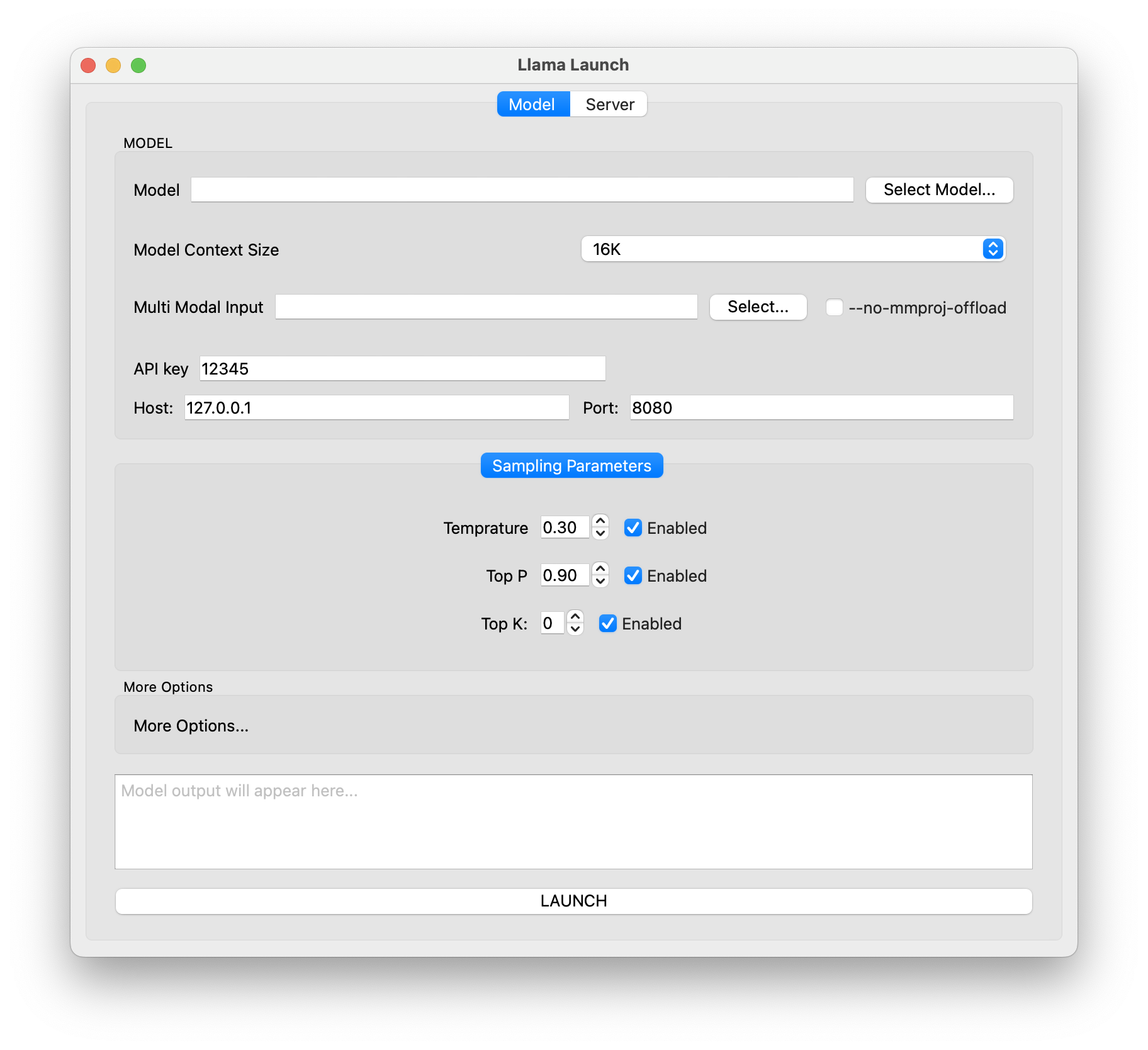 But I could have the label to the left with the text for each, I will mention this to the agent.
Instead of having labels you could have the text such as Temprature for the checkbox (on the left) and remove the labels
Got to love sycophantic agent responces
Good call — cleaner UI. Let me update the UI file to remove the labels and use the checkbox text as the label instead:
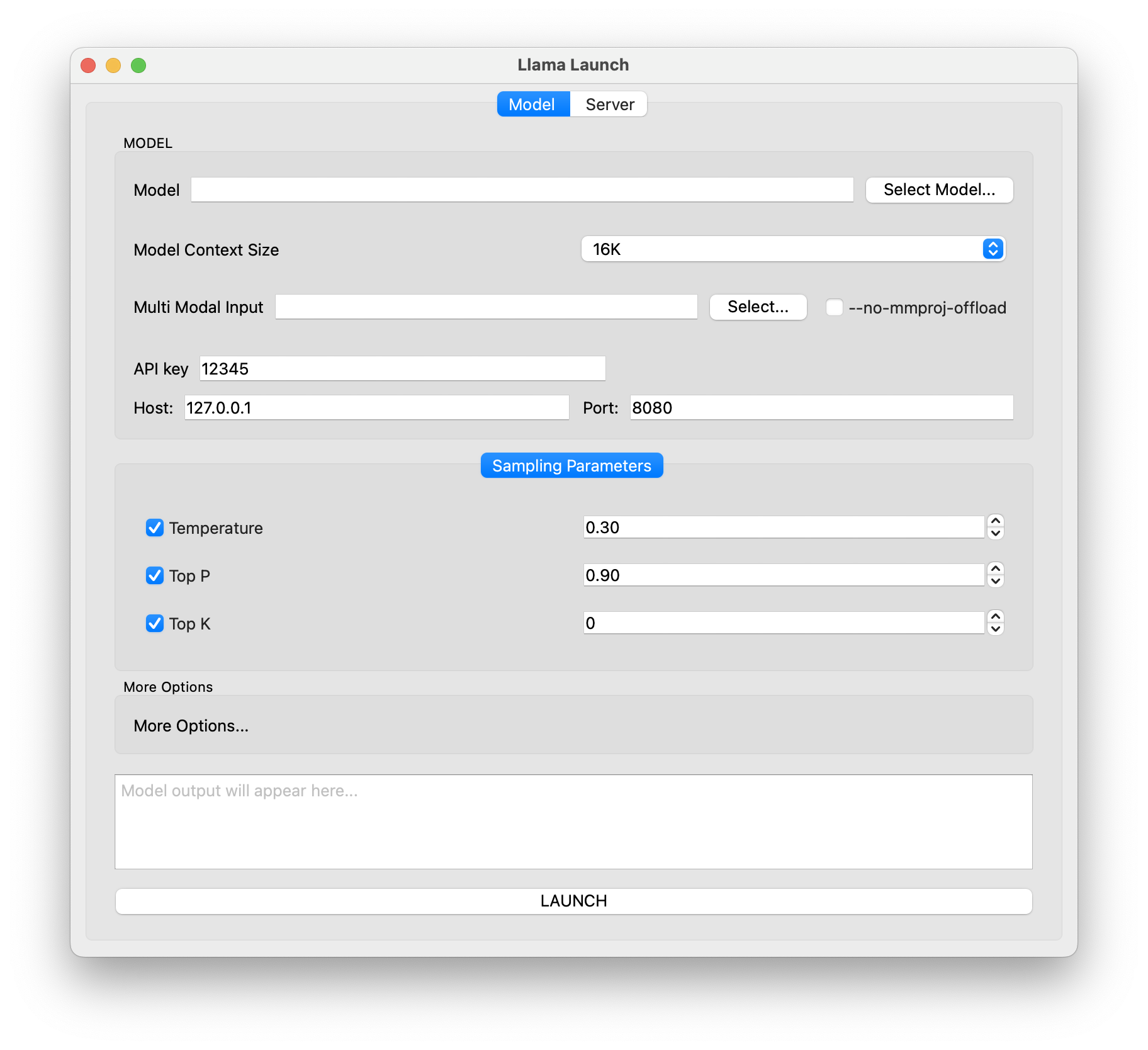 Thats better but lots of wasted space. Let’s make it better.
For each component in the sampling parameters make it a QWidget containing a Form Layout with Checkbox -> ComboBox. The Main tab widget should be a grid layout so I can add many more parameters later.
In AgentChat21.md you can see the whole process. I have had to change the setting on zed and the server to give larger context windows but things seem to work well.
You can inspect what headroom is doing using
curl http://localhost:8787/stats
Which outputs some json data.
"input_tokens_original": 49907,
"input_tokens_optimized": 46782,
"tokens_saved": 3125,
"savings_percent": 6.26
So not much of a reduction in my current working processes.
Zed -> Headroom:        49,907 tokens
Headroom -> llama.cpp:  46,782 tokens
Removed:                3,125 tokens
Full log can be found using headroom perf
Headroom Performance Report
============================================================
Window: last 168h (actual data: 2026-06-15 07:57:47 → 2026-06-15 12:11:19)

Requests:     79
Tokens:       1,553,082 -> 1,445,689 (6.9% reduction)
Total saved:  107,384 tokens

Per-Model Breakdown
----------------------------------------
  LLamaServerCurrentModel: 77 reqs, 107,384 tokens saved (7%), list price unknown
  passthrough:models: 2 reqs, 0 tokens saved (0%), list price unknown
  * Actual bill savings depend on provider caching behavior

Cache Performance
----------------------------------------
  Cache read:    1,095,614 tokens
  Cache write:   0 tokens
  Hit rate:      100.0%
  First 5 avg:   read=11,554 write=0
  Last 5 avg:    read=41,980 write=0
  -> Cache stabilizing over conversation lifetime

Optimization Overhead
----------------------------------------
  Average:  955ms
  Max:      29684ms
  >500ms:   18 requests

Conversation Size
----------------------------------------
  Min msgs:  1
  Max msgs:  62
  Avg msgs:  19

Transform Effectiveness
----------------------------------------
  content_router: 1.0% avg reduction, 76 uses, 8,880 saved

Content Router Routing
----------------------------------------
  Compressed:  36 (13%)
  Excluded:    9 (3%) — Read/Glob outputs
  Skipped:     118 (44%) — <50 words
  Unchanged:   105 (39%) — ratio too high

TOIN Learning
----------------------------------------
  Patterns:     14
  Compressions: 17
  Retrievals:   0 (0.0%)

Recommendations
----------------------------------------
  1. 18 requests took >500ms for optimization — consider reducing transform pipeline

Log files: 1 | Lines parsed: 1,699
Log dir: /Users/jmacey/.headroom/logs
I will keep using this system and see how it goes. Next time I’m going to add some more parameters.